
Bulk WHOIS Lookup: Auditing a Whole Domain Portfolio
A practical bulk WHOIS lookup guide: audit every domain's expiry and registrar at once, work around WHOIS/RDAP rate limits, and keep the data fresh.
A bulk WHOIS lookup is how you answer, in one pass, the questions that are tedious to answer one domain at a time: which of our domains expire in the next 90 days, which registrar is each one on, and which are quietly locked or on hold. If you own more than a handful of domains, checking them individually doesn't scale — and the gaps between checks are exactly where a forgotten renewal slips through. This guide covers how to audit a whole portfolio at once and, just as importantly, how to do it without tripping over the rate limits that make naive bulk lookups fail.
Why one-at-a-time doesn't scale
Running whois by hand is fine for a single domain. Across a portfolio it falls apart:
- It's slow. A few dozen domains is an afternoon of copy-paste.
- The output is inconsistent. Every TLD formats its record differently, so there's no clean way to compare expiry dates across .com, .co.uk and .io without manual parsing.
- It's a snapshot. Whatever you find today is stale next week, and nobody re-runs the whole list on a schedule.
- It's easy to miss domains entirely — the ones not in your spreadsheet are the ones that lapse.
What to capture for every domain
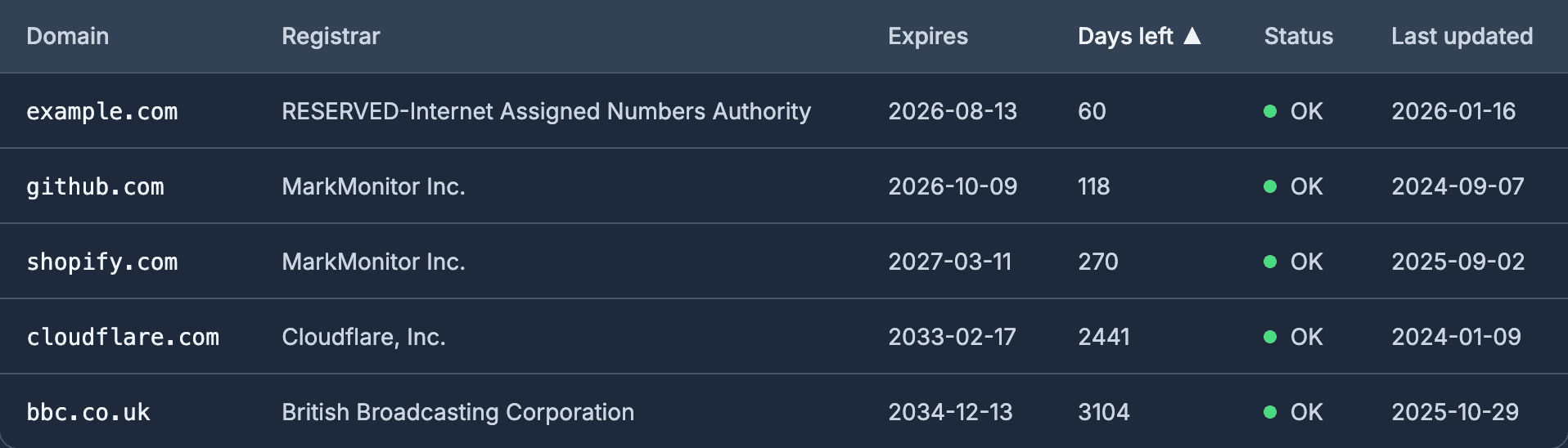
A useful portfolio audit pulls the same handful of fields for each domain, so you can sort and filter the whole list:
- Registry expiry date — the field that drives renewal decisions.
- Registrar — to see how scattered your estate is.
- Status codes — to spot
clientHold,redemptionPeriodor a missing registrar lock. - Nameservers — to catch DNS hosted somewhere you didn't expect.
- Creation/updated dates — handy for spotting unexpected recent changes.
Laid out as a table, this immediately surfaces the outliers: the domain expiring in three weeks, the one still on a registrar you migrated away from, the one with no transfer lock.
The rate-limit reality of WHOIS and RDAP
Here's the part that trips up most home-grown bulk scripts. WHOIS servers are aggressively rate-limited. Registries and registrars throttle queries by IP to prevent scraping, so a loop that fires off a hundred whois calls in quick succession will start getting empty responses, timeouts, or outright blocks partway through — and you won't always get a clear error, just incomplete data.
Some practical realities:
- Limits vary by registry and aren't published precisely. Verisign (.com/.net), Nominet (.uk) and others each enforce their own thresholds.
- RDAP is the better path for automation. RDAP is the structured JSON successor to WHOIS, returns consistent fields across TLDs, and is the protocol registries are standardising on — but it's rate-limited too.
- Naive parallelism backfires. Firing all your queries at once is the fastest way to get throttled. Sensible bulk tools pace and back off — spacing requests, retrying with delays, and caching results so they don't re-query needlessly.
- You need a strategy, not just a loop. Respecting limits, handling partial failures and re-checking on a schedule is the actual work; the lookup itself is the easy bit.
This is why "just write a bash loop" rarely produces a reliable portfolio audit — the script works for ten domains and silently returns garbage for a hundred.
A free tool for one-off bulk checks
If you want to audit a list of domains right now without writing anything, DomainOps offers a free bulk WHOIS tool at /tools/bulk-whois-checker. You paste in a list of domains and it returns expiry dates, registrars and status codes for the lot — handling the rate-limiting and the per-TLD parsing so you don't have to. It's a good first step for inventorying an estate you've never fully catalogued, or for a quick health check before a renewal cycle.
From one-off audit to ongoing monitoring
A bulk lookup is brilliant for a point-in-time audit, but remember what it is: a snapshot. The expiry dates it returns are correct today and creeping closer every day after. The natural next step, once you've inventoried the portfolio, is to keep those checks running automatically.
| One-off bulk lookup | Ongoing monitoring | |
|---|---|---|
| Catalogues the portfolio | Yes | Yes |
| Stays current | No — re-run manually | Yes — re-checked on a schedule |
| Alerts before expiry | No | Yes |
| Flags status changes | At the moment you run it | Whenever they happen |
The audit tells you where you stand; monitoring keeps you there. The same WHOIS/RDAP data that powers a one-off check, polled regularly and compared against thresholds, becomes an early-warning system for the whole estate.
Putting it together
A sensible workflow for a real portfolio:
- Inventory every domain, including the ones you're unsure about, with a bulk lookup.
- Review the results — sort by expiry date, flag anything on an unexpected registrar or missing a transfer lock.
- Consolidate where it makes sense, then load the list into monitoring so it stays fresh.
DomainOps does both halves: the free bulk WHOIS checker for the one-off audit, and continuous WHOIS/SSL/DNS monitoring with email, Slack and Pushover alerts for everything after. It monitors and alerts — it isn't a registrar, so it won't renew domains for you, but it will make sure you never miss the moment to renew them yourself. Get started in a few minutes.